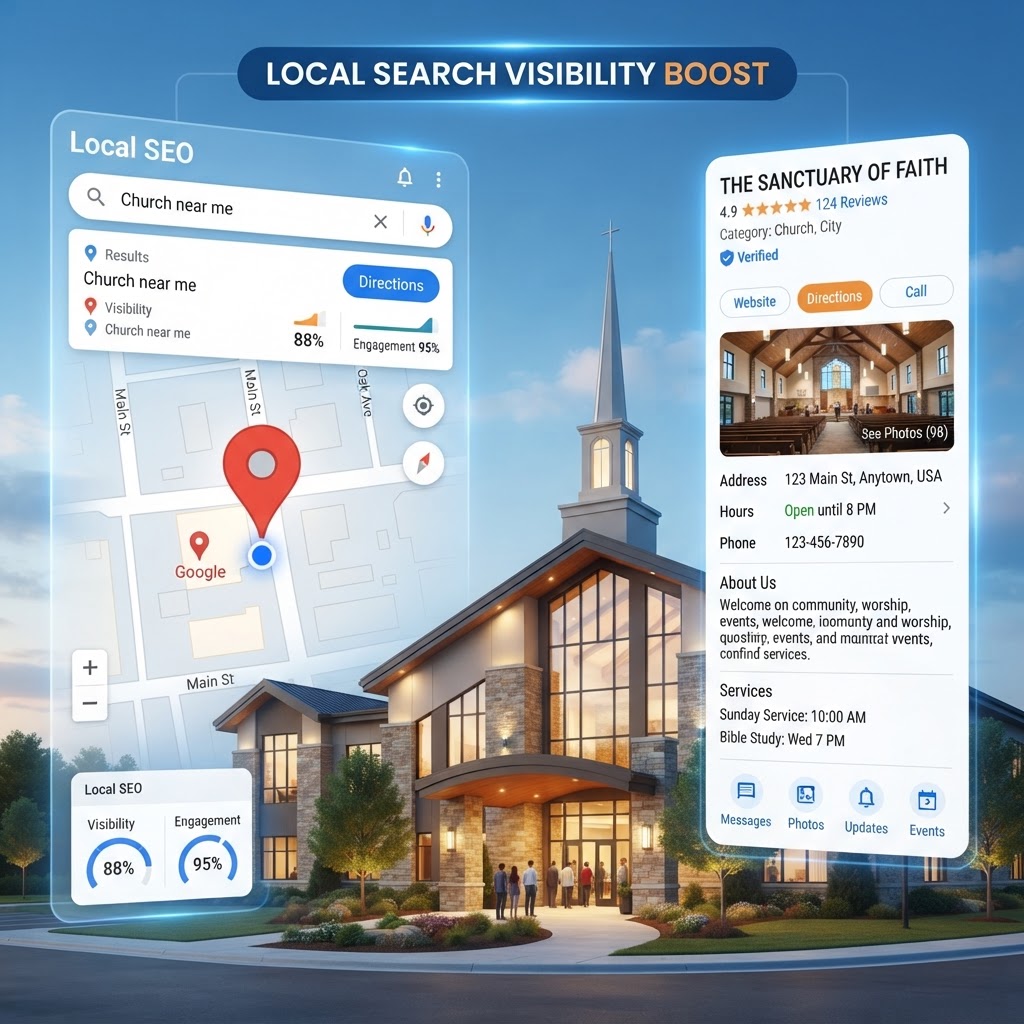
When someone in your community searches "churches near me" on Google, what do they see? If your church doesn't have an optimized Google Business Profile (formerly Google My Business), you're invisible to the people actively looking for a church home. Google Business Profile is the single most powerful free tool for local church growth — and most churches either don't have one or haven't optimized it.
In this complete guide, we'll walk you through everything you need to know about Google Business Profile for churches — from setup to optimization to ongoing management — so your church shows up when it matters most.
46% of all Google searches are local. When someone searches "church near me," the Google Business Profile results are what they see first — above your website. If your profile isn't optimized, you're losing visitors before they even click.
What Is Google Business Profile?
Google Business Profile (GBP) is a free tool from Google that lets you manage how your church appears in Google Search and Google Maps. When someone searches for your church by name or searches for "churches near [city]," your GBP listing is the box that appears on the right side of search results and on the map.
Your GBP listing includes:
- Church name, address, and phone number
- Service times and special hours
- Website link
- Photos and videos
- Google reviews and ratings
- Posts about events and announcements
- Questions and answers from the community
- Directions button for easy navigation
Why Google Business Profile Matters for Churches
Your GBP listing is often the first impression someone has of your church — before they ever visit your website. Here's why it's critical:
- Appears above website results: For local searches, GBP listings show up before organic website results
- Shows on Google Maps: People navigating to your church use Maps — your listing must be accurate
- Builds trust through reviews: Reviews from members and visitors build credibility
- Drives website traffic: The link to your website in your GBP listing is a major traffic source
- Free exposure: Google gives this away for free — there's no reason not to use it
- Local SEO boost: A well-optimized GBP improves your overall local search ranking — local SEO guide
How to Set Up Google Business Profile for Your Church
Step 1: Claim or Create Your Listing
- Go to business.google.com and sign in with your church's Google account
- Search for your church name — if it already exists (Google often auto-creates listings), claim it
- If it doesn't exist, create a new listing
- Choose "Religious organization" or "Church" as your primary category
Step 2: Verify Your Church
Google needs to verify that you're authorized to manage your church's listing. Verification options:
- Postcard by mail: Google sends a postcard with a verification code — takes 5-14 days
- Phone verification: Sometimes available — instant
- Video verification: Record a short video showing your church's exterior and interior
Step 3: Fill Out Every Field
Google rewards complete listings. Fill out every single field available:
- Business name: Use your church's official name — don't keyword stuff
- Address: Must be the physical location — not a PO box
- Phone number: Use a local number, not an 800 number
- Website: Link to your church website — need a website?
- Hours: List service times and office hours
- Category: "Church" or "Religious organization" as primary
- Description: Write a compelling 750-character description with keywords naturally included
- Attributes: Select all that apply — wheelchair accessible, family-friendly, etc.
How to Optimize Your Google Business Profile
1. Upload High-Quality Photos
Listings with photos get 35% more clicks and 42% more direction requests. Upload:
- Exterior photo: Clear shot of your church building from the street
- Interior photo: The sanctuary — warm and inviting
- Team/staff photo: Friendly faces of your leadership team
- Community photos: Events, baptisms, youth group, community service
- Videos: Short clips of worship, sermons, or a welcome message from the pastor
- Logo: Your church logo for brand recognition
Add new photos monthly — Google favors active listings.
2. Post Regular Updates
Google Business Profile posts are like mini social media updates that appear in your listing. Post weekly with:
- Upcoming events: Special services, concerts, community events
- Sermon series announcements: What's coming up on Sundays
- Holiday services: Christmas, Easter, special services
- Community outreach: Food drives, volunteer opportunities
- What's new: New ministries, building updates, staff additions
3. Get and Respond to Reviews
Reviews are the #1 local SEO ranking factor for Google Business Profile. Here's how to leverage them:
- Ask members: After a great service or event, ask members to leave a review
- Make it easy: Create a direct review link and share it in your app and email
- Respond to every review: Thank people for positive reviews; address concerns in negative ones
- Be authentic: Don't write fake reviews — Google can detect and penalize this
- Aim for quantity and quality: More 5-star reviews = higher rankings and more trust
4. Manage Questions and Answers
Anyone can ask a question on your GBP listing, and anyone can answer. Don't let the community answer for you — monitor and respond to every question:
- Check weekly for new questions
- Answer promptly and thoroughly
- Seed common questions yourself — "What time is service?" "Is there kids' ministry?"
- Link to relevant pages on your website when appropriate
5. Select All Relevant Attributes
Attributes help your church appear in specific searches. Select all that apply:
- Wheelchair accessible entrance and parking
- Family-friendly
- Gender-neutral restrooms
- Nursery or childcare available
- Livestream available — livestreaming guide
- Online giving available
Enable Google Business Messaging
Google Business Profile includes a messaging feature that lets people text your church directly from your listing. This is huge for visitor conversion — people can ask questions without picking up the phone.
- Enable messaging in your GBP dashboard
- Set up auto-responses for after hours
- Respond within 24 hours — Google tracks response time
- Use it for visitor questions, prayer requests, and event info
For churches that want even more powerful visitor communication, an AI church assistant can handle messaging automatically.
Use Google Business Profile Insights
Your GBP dashboard includes analytics that show how people find and interact with your listing. Track:
- Search queries: What terms people used to find you
- Views: How many people saw your listing on Search and Maps
- Actions: Calls, website clicks, direction requests
- Photo views: Which photos get the most engagement
- Review trends: New reviews and average rating over time
Combine this data with Google Analytics for a complete picture of your digital reach.
Common Google Business Profile Mistakes
- Incomplete listing: Leaving fields empty — Google rewards complete profiles
- No photos: A listing without photos looks abandoned
- No posts: An inactive listing drops in rankings over time
- Ignoring reviews: Not responding to reviews signals you don't care
- Keyword stuffing: "Best Church in Dallas Texas Family Friendly" as your name — Google penalizes this
- Wrong hours: Outdated service times frustrate visitors — keep them current
- No website link: Missing the link to your church website — build a website
- Multiple listings: Duplicate listings confuse Google and split your reviews
Google Business Profile + Church Website = Growth
Your Google Business Profile and church website work together. Your GBP listing gets people to click; your website converts them into visitors. If either is weak, the other suffers:
- Strong GBP + weak website: People click but leave — your website doesn't sell the visit
- Weak GBP + strong website: Great website but nobody finds it — local SEO is missing
- Strong GBP + strong website: People find you, click through, and plan a visit
Google Business Profile Checklist for Churches
- Listing claimed and verified
- All fields completed (name, address, phone, website, hours, description)
- Primary category set to "Church" or "Religious organization"
- At least 10 high-quality photos uploaded
- Weekly posts published
- Messaging enabled and monitored
- All relevant attributes selected
- Reviews actively requested and responded to
- Q&A monitored and answered
- Hours updated for holidays and special services
- Insights reviewed monthly
How MyChurch Helps with Local SEO
Managing your Google Business Profile is just one piece of local SEO. At MyChurch, we handle the entire digital presence for churches:
- Local SEO services: GBP setup, optimization, and ongoing management — SEO services
- Church websites: Custom, fast, SEO-optimized sites — website design
- Website management: Ongoing updates, content, and SEO — management plans
- SEO blog content: Monthly blog posts that rank on Google — see our blog
- Google Analytics setup: Track your traffic and growth — included in every plan
- Church mobile apps: Keep members engaged all week — mobile apps
Your Google Business Profile is free — but optimizing it takes time and expertise. Let us handle it for you. Schedule a free consultation and let's make sure your church shows up when your community is searching.
Ready to Transform Your Church's Digital Presence?
Schedule a free consultation with our ministry technology experts and discover how a custom church app or AI-powered tools can grow your congregation.
Book Consultation →